
Hive
One screen for all your AI agents. Find My iPhone, but for terminal agents. macOS only.
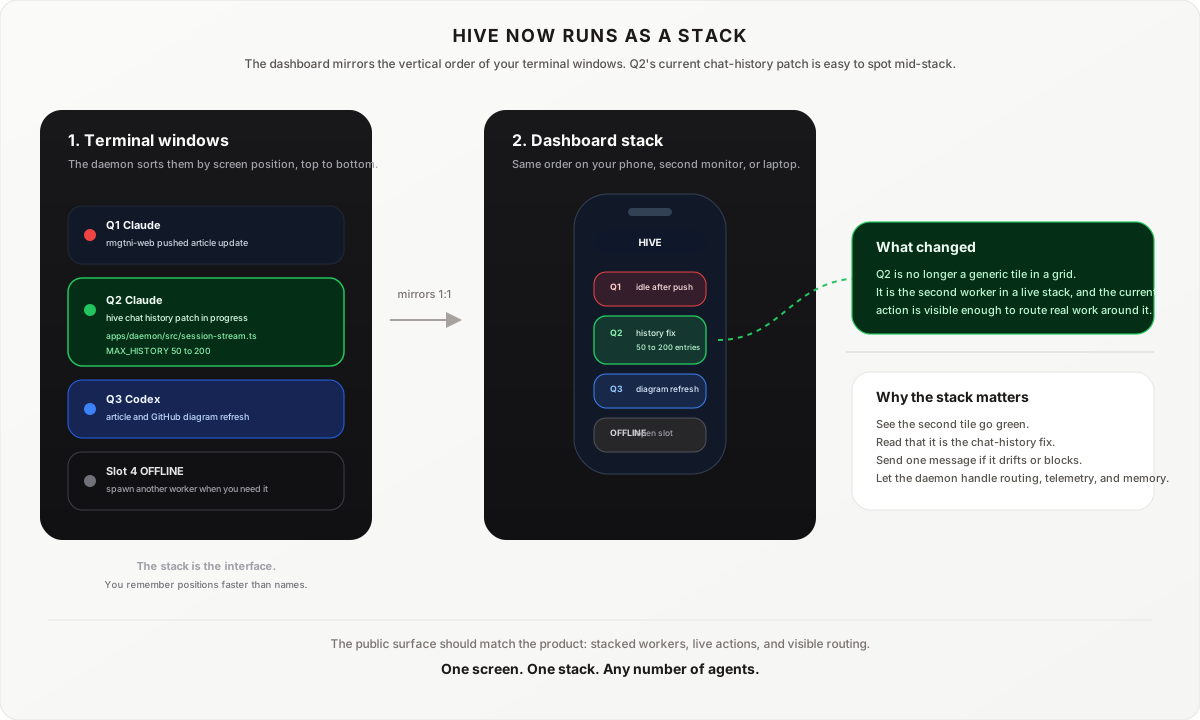
The dashboard maps 1:1 to your terminal layout. Terminals stack vertically on your screen, tiles stack vertically on the dashboard. Top terminal is top tile. Bottom terminal is bottom tile. Green means working. Red means done. Yellow means stuck. You look at your phone and know exactly which terminal needs attention without reading a single line of output.
The daemon reads the vertical position of each Terminal window on your screen and assigns slots to match. Move a terminal higher on screen, it moves up in the dashboard stack. The layout stays consistent because it tracks where your windows actually are, not what order you opened them.
You can run anywhere from 1 to 8 agents. Each agent is a full-width horizontal strip stacked top to bottom. Start with two agents and scale up as your workflow demands.
One person. Up to eight agents. The output of a team.
Why This Helps
Running one AI agent is manageable. Running several at once on different tasks is where things break down. You lose track of which one finished, which one is stuck, and which one drifted from what you asked. You end up alt-tabbing between terminals, re-reading output, and spending more energy tracking status than directing work.
The vertical stack solves this. Your brain is good at spatial memory. When you stack terminals top to bottom and the dashboard mirrors that stack, you stop thinking in terminal names and start thinking in positions. "Top is building the API, third from the top is writing tests." You glance at colored dots and know the state of everything in under a second.
You catch problems by looking, not reading. All green dots means everything is fine. One yellow dot and your eye goes straight to it. You do not read logs. You do not scroll. Color is faster than text because your brain processes it before you consciously look. The spatial layout tells you which terminal to switch to without thinking.
You can walk away. Start your agents, close your laptop, go to lunch. Come back and the dashboard shows you exactly what happened. Green tiles kept working. Yellow tiles are waiting for you. Red tiles finished. You pick up where things paused without re-reading anything.
Put it on any screen. Prop up a tablet next to your laptop and leave the dashboard open. Set it on a second monitor. The colored dots sit there updating in real time while you do other things. When a dot turns yellow, you notice it in your peripheral vision without switching windows or checking anything. It is a status board for your AI fleet, the same way a wall monitor in an ops center shows system health at a glance.
Flag agents for later. Each tile has a small circle in the corner. Tap it and the tile turns orange. That agent is flagged. Use it to mark which agent you want to come back to, which one has something interesting you have not reviewed yet, or which one you want to give a new task when you are ready. Tap again to unflag. It is a bookmark for your attention.
Talk to agents from your phone. Tap any tile, type a message, it goes straight to that agent's terminal. Direct all your agents from the couch. The grid on your phone matches your screen layout, so you always know which agent you are talking to.
Agents coordinate without you bridging every message. File locks prevent two agents from editing the same file. Task queue auto-dispatches work to idle agents. Scratchpad lets agents leave notes for each other. Workflow handoff passes context from one step to the next automatically. You handle direction. They handle implementation.
Every session makes the next one better. Solved problems get saved to a per-project knowledge file. The next agent reads it before starting. Your fleet gets smarter over time.
The safeguards are built in. Auto-pilot handles permission prompts. A watchdog catches stuck loops. File locks prevent edit conflicts. You get a grace period to override from the dashboard before auto-pilot acts.
What You Get
- Stoplight dashboard — vertical stack that mirrors your terminal layout. Green/red/yellow at a glance. Open on your phone, tablet, or second monitor. The tile order matches your terminal order top to bottom. Supports 1-8 agents.
- Multi-model — run Claude, Codex, and OpenClaw agents side by side. Each tile shows which model is running. Spawn any from the dashboard with the "+ Agent" button. Add custom agents via
~/.hive/agents.jsonand they appear in the spawn dialog automatically. - Auto-discovery — start
claude,codex, oropenclaw tuiin any terminal and it appears on the dashboard within 3 seconds. Quadrants are assigned by where the terminal sits on your screen, not by start order. No registration, no config. - Auto-pilot — permission prompts auto-approve after a 15-second grace window. Agents never sit idle waiting for a click.
- Messaging — tap any tile, type a message, it goes straight to that agent's terminal. Messages queue if the agent is busy and drain automatically when it is ready.
- Peer awareness — Claude agents get a one-line peer summary on every prompt, and all workers share the same dashboard/API state. No manual registration.
- Coordination — file locks, task queue, scratchpad, conflict detection. Multiple agents working on the same codebase without stepping on each other.
- Workflow handoff — tag related tasks with a workflow ID. When Agent 1 finishes "Build the API," Agent 2 automatically receives a summary of what was built and which files changed before starting "Build the UI."
- Compound learning — every solved problem gets written to a per-project knowledge file. Fresh agents start with accumulated knowledge instead of a blank slate.
- State persistence — daemon snapshots state every 30 seconds. Restart your computer, reopen terminals, and routing restores after one prompt per terminal.
- Review queue — a slide-out drawer on the dashboard showing recent pushes, deploys, and PRs across all agents. The daemon auto-detects reviewable actions from hook events, and agents can self-report with richer summaries. Tap the three-line icon in the header to see what changed and where.
- Prompt approval — when a freshly spawned agent hits a trust or sandbox prompt, the tile shows the prompt text with an approval button. Tap to approve from the dashboard without switching to the terminal.
- Push notifications — when an agent goes yellow, macOS sends a native notification with the project name and what it needs.
Prerequisites
- macOS (uses AppleScript + CGEvent for terminal interaction)
- Node.js 20+ — nodejs.org
- Xcode Command Line Tools — provides
swiftcfor thesend-returnhelper (xcode-select --install) - At least one supported CLI — Claude Code (
npm install -g @anthropic-ai/claude-code) and/or Codex (npm install -g @openai/codex) and/or OpenClaw (npm install -g openclaw) - Hosted dashboard extras (required for the standard
npm run launchpath) — Homebrew forcloudflared,python3, and a Vercel account (npx vercel login). If you only want localhost, usenpm run launch:localinstead.
Claude, Codex, and OpenClaw can be mixed freely. Claude gets the richest hook-based telemetry. Codex and OpenClaw work out of the box through JSONL, CPU, and PTY detection. Any other terminal agent can be added via a config file (see Custom Agents).
Quick Start
git clone https://github.com/RohitMangtani/hive.git
cd hive
bash setup.sh
npx vercel login
npm run launch
npm run launch is the standard path. It starts the local daemon, opens a Cloudflare quick tunnel for the WebSocket server, deploys or updates your own free Vercel dashboard, opens that hosted URL, and leaves the local daemon and tunnel running in one terminal.
Then open Terminal.app windows (up to 8) and run whichever supported CLI you installed:
claude
or
codex
or
openclaw tui
The daemon auto-discovers any supported CLI in about 3 seconds. Arrange the windows in the screen corners and the dashboard mirrors that layout automatically.
Setup
git clone https://github.com/RohitMangtani/hive.git
cd hive
bash setup.sh
The setup script does 6 things:
- Checks Node.js 20+,
swiftc, and at least one supported CLI - Installs all npm dependencies (monorepo workspaces)
- Generates
~/.hive/tokenand~/.hive/viewer-token - Compiles the
send-returnSwift binary for auto-pilot keystroke injection - Installs or updates Claude Code hooks if Claude is present
- Creates
.envfrom the template
Accessibility Permission (required)
After setup, you must grant Accessibility permission to ~/send-return. This binary sends Return keystrokes to auto-approve agent prompts.
- Open System Settings → Privacy & Security → Accessibility
- Click the + button
- Press Cmd+Shift+G, type
~/send-return, and select it - Toggle it on
Without this, auto-pilot will not work and agents will stall waiting for permission approvals.
Running
You have three supported ways to run Hive:
Standard hosted launch (recommended)
npm run launch
This starts the local daemon on 3001/3002, opens a free Cloudflare quick tunnel for the WebSocket server, deploys or updates the dashboard to your own Vercel account, opens the hosted dashboard URL, and keeps the daemon and tunnel running in one terminal. On a new machine, run npx vercel login once first.
Local-only fallback
npm run launch:local
This starts the daemon and dashboard locally, opens http://localhost:3000, and keeps both running in one terminal.
Manual hosted split (same hosted behavior, separate steps)
npm start
npm run deploy:dashboard
This is the same hosted flow as npm run launch, but split into two commands.
Manual local split (same local behavior, separate terminals)
npm run dev:daemon
npm run dev:dashboard
This opens the dashboard at localhost:3000.
Agents (open Terminal.app windows and run any supported CLI you installed)
claude
or
codex
or
openclaw tui
Stack your terminal windows vertically on screen. The daemon detects their positions and maps each one to the matching tile in the dashboard stack. Mix claude, codex, and openclaw however you want. You can also spawn agents from the dashboard: tap "+ Agent", pick a model, optionally add a task, and hit Spawn. If the CLI isn't installed, the tile shows a clear error instead of silently failing.
4. Install the app on your phone (optional, recommended)
Open the dashboard URL on your phone and add it to your home screen. It runs full-screen like a native app. See the Install as App section below.
Using the Quadrants
Assign tasks by complexity, not by file. Give your hardest task to Q1 (top-left) so you can keep an eye on it. Put your most independent tasks in Q3 and Q4 where they can run unattended longest.
Bridge context between agents. When Agent 1 discovers something Agent 3 needs, tap Agent 3's tile and paste the relevant finding. Or use the scratchpad so any agent can read it.
Give commands to specific agents. Tap any tile and type a plain English instruction: "Stop what you are doing and fix the login bug first" or "Read what Q2 just committed and review it." The message goes straight to that agent's terminal as if you typed it there.
How It Works
Auto-Discovery
Detects Claude, Codex, and OpenClaw processes within 3 seconds via ps + lsof. No configuration needed. Start claude, codex, or openclaw tui in any terminal and the daemon finds it. Supports up to 8 agents simultaneously. The daemon reads the vertical position of each Terminal window on your screen every 10 seconds and assigns slots to match. Move a terminal higher on screen, it moves up in the dashboard stack. Tab titles update automatically to show which slot each terminal is.
Status Tracking
Multi-layer detection pipeline determines real-time status:
- Hook events — Claude Code hooks report every tool call to the daemon (Claude agents)
- JSONL analysis — reads the agent's conversation log for recent activity, extracts the last user message as a direction summary (Claude and Codex)
- CPU signal — falls back to CPU usage (>8% = working) when hooks are delayed (all agents)
- PTY output — detects terminal output flow for agents actively generating text
Auto-Pilot
Auto-approves permission prompts so agents never sit idle waiting for you. The daemon detects when an agent is stuck on a prompt, waits a 15-second grace window (so you can override from the dashboard), then sends a Return keystroke via the send-return binary.
This is how you run agents unattended. You give them tasks and walk away. Auto-pilot keeps them moving.
Coordination
Multiple agents can safely work on the same codebase:
- Peer awareness — Claude agents get a one-line summary of what the other agents are doing (status, project, current action) via the identity hook. Codex workers still share the same fleet state through the dashboard, scratchpad, and REST API.
- File locks — acquire advisory locks before editing shared files (
POST /api/locks) - Conflict detection — check if another agent recently modified a file (
GET /api/conflicts) - Scratchpad — leave ephemeral notes for other agents (
POST /api/scratchpad), auto-expires in 1 hour - Inter-agent messaging — send a prompt to any other agent (
POST /api/message) - Task queue — push tasks to a global queue, auto-dispatched to the next idle agent (
POST /api/queue) - Workflow handoff — tag tasks with the same
workflowIdand the daemon passes completion context automatically. When Agent 1 finishes step 1, the daemon builds a summary of what it did (files created, files edited) and prepends it to step 2 before dispatching to the next agent. Queue it like this:
# Step 1: Build the API
curl -s -H "Authorization: Bearer $TOKEN" -H "Content-Type: application/json" \
  -d '{"task":"Build API endpoints for users","project":"/path/to/project","workflowId":"feature-auth"}' \
  http://localhost:3001/api/queue

# Step 2: Build the UI (waits for step 1)
curl -s -H "Authorization: Bearer $TOKEN" -H "Content-Type: application/json" \
  -d '{"task":"Build UI against the API","project":"/path/to/project","workflowId":"feature-auth","blockedBy":"STEP1_ID"}' \
  http://localhost:3001/api/queue
Agent 2 receives: "Previous step completed by Q3: created src/api/users.ts, created src/api/auth.ts. Your task: Build UI against the API."
Compound Learning
Every solved problem gets written to a per-project knowledge file (.claude/hive-learnings.md). The next agent that works on that project reads it before starting. Every debugging session, every style correction, every architectural decision compounds. After months of running, the system knows things about your projects that no fresh agent could replicate.
State Persistence
The daemon writes ~/.hive/daemon-state.json every 30 seconds and on shutdown. If the daemon restarts, it rehydrates workers, message queues, locks, and workflow handoffs from the snapshot (discarded if older than 10 minutes). Discovery reconciles actual processes within 3 seconds. You do not configure this. It just works.
Session Routing (Restart Resilience)
When you open 4 terminals within seconds of each other, their session log files are created nearly simultaneously. The daemon needs to know which log file belongs to which terminal. It solves this with marker files for Claude and rollout-log matching for Codex:
- Claude terminals write
~/.hive/sessions/{tty}with their session ID on every prompt (via theidentity.shhook) - The daemon reads those marker files on startup and uses them as ground truth, while Codex workers are re-associated from their rollout JSONL files
- Marker files persist across computer restarts, so Claude mappings are durable too
On a fresh computer restart, the old marker files are overwritten the moment you type your first prompt in each terminal. The daemon picks up the correct mapping within 3 seconds. This means routing is accurate after one prompt per terminal, which is invisible to you since you would be typing anyway.
Push Notifications
When any agent transitions to stuck (yellow), macOS sends a native notification with the agent name, project, and what it needs. 60-second cooldown per agent prevents spam. Configure at ~/.hive/notifications.json (enabled, cooldownMs, errorThreshold, sound). Defaults work out of the box.
Watchdog
Monitors agents for stuck loops (same tool called 6+ times in a row). Detects when agents are spinning on a problem and escalates to the dashboard so you can intervene. Does not send messages to agents automatically.
API Reference
All endpoints require the auth token from ~/.hive/token via the Authorization: Bearer <token> header.
Base URL: http://localhost:3001
Workers
| Method | Endpoint | Description |
|---|---|---|
GET | /api/workers | List all agents with status, TTY, project, current action |
Messaging
| Method | Endpoint | Body | Description |
|---|---|---|---|
POST | /api/message | {workerId, content} | Send a prompt to any agent. Queued if busy, returns message ID. |
GET | /api/message-queue | — | View queued messages with IDs, previews, and timestamps |
DELETE | /api/message-queue/:id | — | Cancel a queued message before it's delivered |
Task Queue
| Method | Endpoint | Body | Description |
|---|---|---|---|
GET | /api/queue | — | View all queued tasks |
POST | /api/queue | {task, project?, priority?, blockedBy?, workflowId?} | Push a task. Auto-dispatched to next idle agent. Add workflowId to link related tasks for automatic handoff. |
DELETE | /api/queue/:id | — | Remove a queued task |
File Coordination
| Method | Endpoint | Body / Query | Description |
|---|---|---|---|
GET | /api/locks | — | List all active file locks |
POST | /api/locks | {workerId, path} | Acquire lock. Returns 409 if already locked. |
DELETE | /api/locks | ?workerId=X&path=Y | Release lock (omit path to release all) |
GET | /api/conflicts | ?path=X&excludeWorker=Y | Check if another agent recently modified a file |
Scratchpad
| Method | Endpoint | Body / Query | Description |
|---|---|---|---|
GET | /api/scratchpad | ?key=X (optional) | Read notes. Omit key for all entries. |
POST | /api/scratchpad | {key, value, setBy} | Set a shared note. Auto-expires in 1 hour. |
DELETE | /api/scratchpad | ?key=X | Remove a note |
Learning & Artifacts
| Method | Endpoint | Body / Query | Description |
|---|---|---|---|
POST | /api/learning | {project, lesson} | Persist a lesson to the project's learning file |
GET | /api/artifacts | ?workerId=X (optional) | Recent file changes by an agent |
Review Queue
| Method | Endpoint | Body / Query | Description |
|---|---|---|---|
GET | /api/reviews | ?unseen=1 (optional) | List review items. Add ?unseen=1 for unread only. |
POST | /api/reviews | {summary, url?, type?, workerId?} | Report a reviewable change. Type: deploy/commit/pr/push/review-needed/general. |
PATCH | /api/reviews/:id | {action: "seen"} | Mark a review as seen |
PATCH | /api/reviews | — | Mark all reviews as seen |
DELETE | /api/reviews/:id | — | Dismiss a review |
The daemon also auto-detects git push, gh pr create, and Vercel deploys from hook events and creates review items automatically. Agents can self-report with richer summaries via the POST endpoint.
Diagnostics
| Method | Endpoint | Query | Description |
|---|---|---|---|
GET | /api/audit | ?tty=X (optional) | Status change audit log |
GET | /api/signals | ?workerId=X (optional) | Raw signal data (hooks, CPU, JSONL) |
GET | /api/debug | — | Full daemon state dump |
Example: Send a task to an idle agent
TOKEN=$(cat ~/.hive/token)

# Check who's available
curl -s -H "Authorization: Bearer $TOKEN" http://localhost:3001/api/workers | jq '.[] | {id, tty, status}'

# Send a message to a specific agent
curl -s -H "Authorization: Bearer $TOKEN" \
  -H "Content-Type: application/json" \
  -d '{"workerId":"WORKER_ID","content":"Fix the login bug in src/auth.ts"}' \
  http://localhost:3001/api/message

# Queue a task for the next idle agent
curl -s -H "Authorization: Bearer $TOKEN" \
  -H "Content-Type: application/json" \
  -d '{"task":"Write tests for the payment module","project":"/path/to/project"}' \
  http://localhost:3001/api/queue
How Agents Use Hive
Claude agents read instructions from ~/.claude/CLAUDE.md that tell them how to interact with the daemon. Here's what that hook-driven path does automatically:
- Identify themselves — read
~/.hive/workers.jsonon startup to find their quadrant. On every prompt, the identity hook also injects a peer summary showing what the other agents are doing. - Check learnings — read
.claude/hive-learnings.mdbefore starting any task - Lock files — acquire locks before editing files other agents might touch
- Write learnings — persist lessons after solving non-obvious problems
- Dispatch work — send tasks to other agents when the work involves a different project or needs a fresh perspective
- Use scratchpad — leave notes about in-progress work for other agents
These behaviors are configured through the CLAUDE.md instructions, not hardcoded. Codex workers still participate in discovery, messaging, queueing, and shared state, but they do not use the Claude hook path.
Custom Agents
Hive ships with Claude, Codex, and OpenClaw support built in. To add any other terminal agent, create ~/.hive/agents.json:
[
  {
    "id": "aider",
    "label": "Aider",
    "processPattern": "aider",
    "spawnCommand": "aider",
    "sessionDir": "~/.aider/sessions/"
  }
]
| Field | Required | Description |
|---|---|---|
id | yes | Unique identifier (used internally) |
label | yes | Display name on dashboard |
processPattern | yes | Regex to match the process in ps output |
spawnCommand | yes | CLI command to run in Terminal.app |
sessionDir | no | Directory to scan for JSONL session files |
The daemon watches this file and reloads when it changes. No restart needed.
The easiest way to add a new agent: Ask one of your running agents. Tell Claude or Codex "add Aider support to Hive" and it writes the config entry to ~/.hive/agents.json. The daemon picks it up on the next scan.
Configuration
Environment Variables (.env)
| Variable | Default | Description |
|---|---|---|
HIVE_PROJECT | ~/factory/projects/hive | Path to the Hive project root |
SEND_RETURN_BIN | ~/send-return | Path to the CGEvent binary for auto-pilot |
NEXT_PUBLIC_WS_URL | ws://localhost:3002 | WebSocket URL the dashboard connects to |
Claude Code Hooks
If Claude Code is installed, setup installs or updates these hooks in ~/.claude/settings.json:
- UserPromptSubmit — registers the TTY/session mapping and injects identity + peer summary
- PreToolUse — fires before every tool call, reports tool name to daemon
- PostToolUse — fires after every tool call, reports result
- Notification — fires on agent notifications (errors, completions)
- Stop — fires when an agent session ends
bash setup-hooks.sh is idempotent. It merges Hive hooks into existing settings instead of replacing them.
Authentication
Setup generates a random token at ~/.hive/token. All API requests require this token. The daemon reads it on startup. Agents read it via their hook commands.
Architecture
Daemon (Node.js, port 3001 + 3002)
├── Discovery     — finds Claude + Codex + OpenClaw processes via ps + lsof every 3s
├── Telemetry     — receives hook events and inferred signals, maintains worker state
├── Auto-pilot    — detects stuck prompts, auto-approves via send-return
├── Arrange       — detects terminal positions, assigns quadrants by screen location
├── Watchdog      — detects stuck loops, escalates to dashboard
├── State store   — snapshots daemon state every 30s, restores on restart
├── Notifications — macOS native alerts when agents go stuck
├── Task queue    — global work queue, auto-dispatches to idle agents
├── Coordination  — file locks, scratchpad, conflict detection, learnings
├── API routes    — REST endpoints for all coordination features
└── WebSocket     — pushes live state to dashboard every 3 seconds

Dashboard (Next.js, port 3000 — installable as PWA)
├── Vertical stack — stoplight status cards matching terminal layout top to bottom
├── Live chat     — stream each agent's conversation history
├── Review queue  — slide-out drawer of recent pushes, deploys, and PRs
├── Controls      — send messages, spawn agents, view queue
└── Service worker — offline caching, instant repeat loads
Key Files
| File | Purpose |
|---|---|
apps/daemon/src/index.ts | Entry point, initializes all systems |
apps/daemon/src/discovery.ts | Process discovery and status detection |
apps/daemon/src/telemetry.ts | Hook event receiver, worker state machine |
apps/daemon/src/auto-pilot.ts | Automatic prompt approval |
apps/daemon/src/tty-input.ts | AppleScript + CGEvent terminal interaction |
apps/daemon/src/arrange-windows.ts | Window position detection and quadrant assignment |
apps/daemon/src/api-routes.ts | All REST API endpoints |
apps/daemon/src/ws-server.ts | WebSocket server for dashboard |
apps/daemon/src/watchdog.ts | Stuck loop detection |
apps/daemon/src/state-store.ts | Snapshot persistence across restarts |
~/.hive/identity.sh | Claude hook: injects quadrant ID + peer summary on every prompt |
~/.hive/sessions/ | Claude TTY→session marker files written by identity.sh |
apps/daemon/src/notifications.ts | macOS push notifications on stuck |
apps/daemon/src/task-queue.ts | Global task queue |
apps/daemon/src/lock-manager.ts | File lock coordination |
apps/daemon/src/review-store.ts | Review queue for tracking reviewable changes |
apps/daemon/src/scratchpad.ts | Ephemeral shared notes |
apps/daemon/src/session-stream.ts | Chat history streaming from JSONL |
tools/send-return.swift | CGEvent binary source (Return keystroke) |
packages/types/ | Shared TypeScript types |
Troubleshooting
Agents not showing up on dashboard
- Make sure the daemon is running (
npm run dev:daemon) - If you're running Claude, check that hooks are configured:
cat ~/.claude/settings.json | grep hooks - If you're running Codex only, missing Claude hooks is expected
- The daemon discovers agents every 3 seconds. Wait a moment.
Auto-pilot not working (agents stuck on prompts)
- Grant Accessibility permission to
~/send-return(see Setup section) - Test it manually:
~/send-returnshould send a Return keystroke to the frontmost app - Check daemon logs for
[auto-pilot]messages
"Connection refused" errors
- Daemon must be running on port 3001 before agents start
- Check nothing else is using port 3001:
lsof -i :3001
Dashboard shows stale data after restart
- This is normal for the first few seconds. Send one prompt to each terminal and the routing self-corrects.
- Refresh the page. WebSocket reconnects automatically.
- Check that port 3002 is reachable:
curl http://localhost:3002
Chat history showing in the wrong terminal
- The daemon may have mapped session files incorrectly. Send a prompt to each terminal and the marker files update automatically.
- Check marker files:
ls ~/.hive/sessions/should show one file per active TTY - Force re-mapping: restart the daemon (
npm run dev:daemon)
Hooks not reporting events
- This applies to Claude Code only
- Verify hooks exist:
cat ~/.claude/settings.json | jq .hooks - Re-run
bash setup-hooks.shto repair or update the Hive hook entries. - Test a hook manually: start
claude, use any tool, check daemon logs for[telemetry]events.
Build errors
- Make sure you're on Node.js 20+:
node -v - Try
npm installfrom the project root - For TypeScript errors:
npx turbo buildto see full output
Install as App
The dashboard is a PWA (Progressive Web App). After deploying, install it on your phone for the best experience:
iPhone / iPad:
- Open the dashboard URL in Safari
- Tap the share button (box with arrow)
- Tap "Add to Home Screen"
- Open from your home screen — full-screen, no browser chrome
Android:
- Open the dashboard URL in Chrome
- Tap the three-dot menu
- Tap "Add to Home screen" or "Install app"
The app caches itself via service worker, so repeat opens are instant. It works like a native app — own icon, own entry in the app switcher, dark status bar matching the dashboard theme.
Deploy Your Own Dashboard
For a hosted dashboard, use the current Hive architecture:
npm startto run the daemon and create a free Cloudflare quick tunnel forws://localhost:3002npm run deploy:dashboardto deployapps/dashboardto your own Vercel account using that tunnel URL- Keep
npm startrunning while you use the deployed dashboard
npm run deploy:dashboard reads the current tunnel URL from ~/.hive/tunnel-url.txt, converts it to wss://..., and passes it to Vercel as NEXT_PUBLIC_WS_URL for that deployment.
Every clone is a completely independent instance. Setup generates a unique auth token at ~/.hive/token. Your daemon, your agents, your dashboard, your data. Nothing connects to anyone else's setup. Two people can run Hive on the same network without any interference.
Development
# Install dependencies
npm install

# Run daemon in dev mode (auto-restarts on changes)
npm run dev:daemon

# Run dashboard in dev mode
npm run dev:dashboard

# Build everything
npm run build

# Run tests
npm -w apps/daemon test
The project uses npm workspaces with Turbo for build orchestration. The daemon and dashboard are separate apps that share types via packages/types/.
How This Was Built
This was built using the agents it manages. Multiple AI agents, a mix of Claude Code and Codex, iterated on the daemon and dashboard simultaneously while a human directed architecture and resolved conflicts. The compound learning system was tested in production from day one, with each session's lessons feeding the next.
License
MIT
还没有评论。